Faceted Searches for Drupal
Apache SOLR


We run Apache Solr on localhost:8983 with a default Drupal schema that is works in conjunction with with Search API Solr Search. We do not support custom schemas at this time.
Probo has two cores installed. One for Drupal 7, and one for Drupal 8 - 11. The cores are intuitively named drupal7 and drupal. Note that the drupal core is for Drupal versions 9 and above. Drupal 8 is EOL for Drupal.org and is below support for Search API. Below are the current schema versions installed for each version:
Drupal 7: 7.x-1.15
Drupal 8/9: 4.2.3 Drupal 10/11: 4.3.10
We will periodically update these and communicate these changes as new versions of these modules are released. Build images are typically updated the first weekend of every month. Please follow the Changelog for information on specific updates. You can also get the current versions of things in the image by referencing the Docker Images Page in the section on versionizer.
The easiest way to integrate SOLR into your Drupal 8/9/10/11 site is to append the following information to the Drupal Plugin as part of your settingsAppend configuration:
steps:
  - name: Install and Update Drupal
    plugin: Drupal
    database: drupal-database.sql.gz
    databaseGzipped: true
    databaseUpdates: true
    clearCaches: true
    drupalVersion: 8
    settingsAppend: |
      $config['search_api.server.solr']['backend_config']['connector'] = 'standard';
      $config['search_api.server.solr']['backend_config']['connector_config']['scheme'] = 'http';
      $config['search_api.server.solr']['backend_config']['connector_config']['host'] = 'localhost';
      $config['search_api.server.solr']['backend_config']['connector_config']['core'] = 'drupal';
      $config['search_api.server.solr']['backend_config']['connector_config']['path'] = '/';
      $config['search_api.server.solr']['backend_config']['connector_config']['timeout'] = '5';
      $config['search_api.server.solr']['backend_config']['connector_config']['index_timeout'] = '5';
      $config['search_api.server.solr']['backend_config']['connector_config']['optimize_timeout'] = '10';
      $config['search_api.server.solr']['backend_config']['connector_config']['finalize_timeout'] = '30';
      $config['search_api.server.solr']['backend_config']['connector_config']['commit_within'] = '1000';
If you choose not to use the settingsAppend solution, your SOLR settings inside your Probo build need to look as follows:
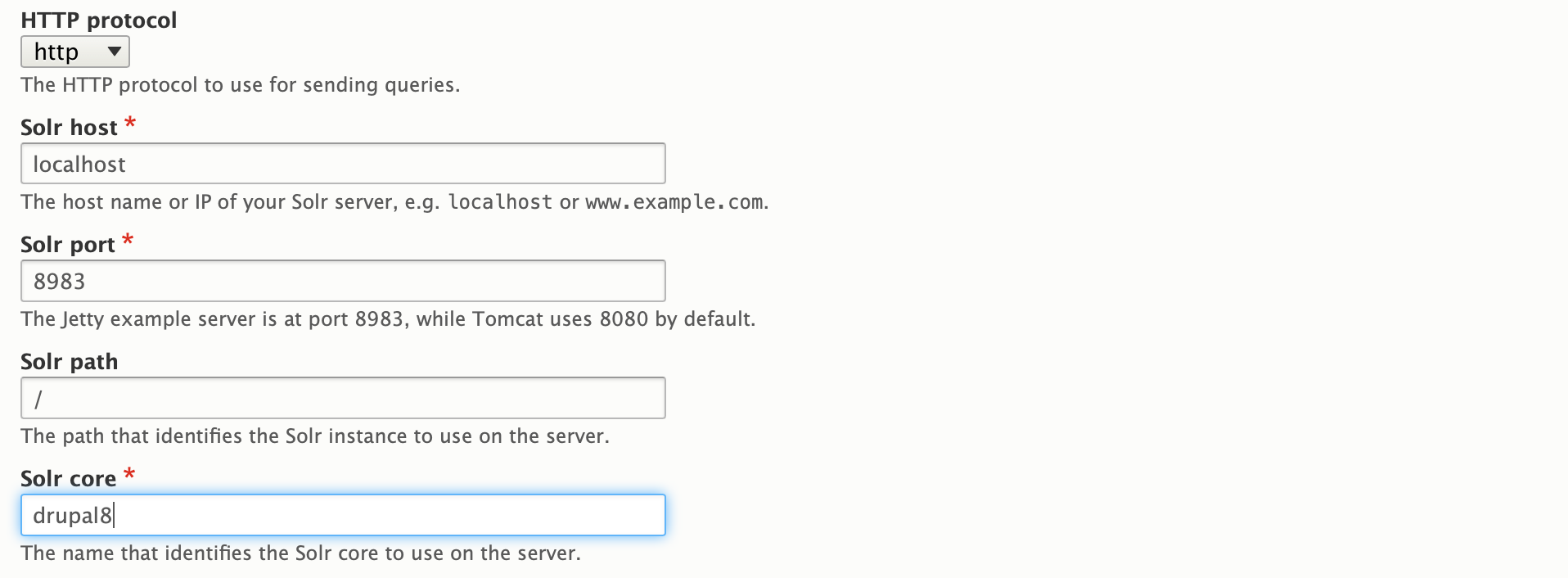
Additionally you can automatically import into SOLR using Drush:
  - name: Clear SOLR Index
    command: drush -r /var/www/html sapi-r -y

  - name: Index SOLR
    command: drush -r /var/www/html sapi-i --batch-size=100 -y

Get a free trial with our starter plan or look over some of our more advanced plans and choose the best solution for your company or organization!
GET STARTED FREE